How to Set Up Fan Control in CoolCurve
Set fan speeds from the menu bar or use custom curves to increase cooling as a sensor warms. How to start with CoolCurve, switch presets and return to Automatic.
On this page
CoolCurve lets you adjust fan speeds directly from the menu bar or set a curve that raises the requested speed as a temperature sensor warms. A curve is useful when you want fans to ramp up earlier during sustained work without repeatedly moving a slider. The result depends on your Mac, its workload and the limits enforced by its hardware.
Temperature monitoring is free, with no trial and no license required. Manual fan control, custom curves, sensor rules, presets and automatic preset switching run during the full feature trial and need a paid license once it ends. CoolCurve requires Apple silicon and macOS 13 or later; a fanless Mac has no fan speed to control.
Start with the menu bar controls
- Download CoolCurve, open it and check that it lists your Mac's fans and sensors.
- Follow the app's helper setup instructions in System Settings before changing fan speeds.
- Open the menu bar panel and adjust a fan's slider when you want a direct speed change. Watch the reported speed as well as the selected target; firmware can limit what the fan accepts.
- Choose Auto when you want macOS to manage that fan again.
Make a curve for sustained work
Open Fan Curves to choose a sensor and shape how your requested fan speed changes with temperature. For work where you prefer earlier cooling, make the curve rise earlier instead of leaving one fixed speed selected for the whole session. A curve trades fan noise against cooling; it is not a promise of a particular temperature or performance gain.
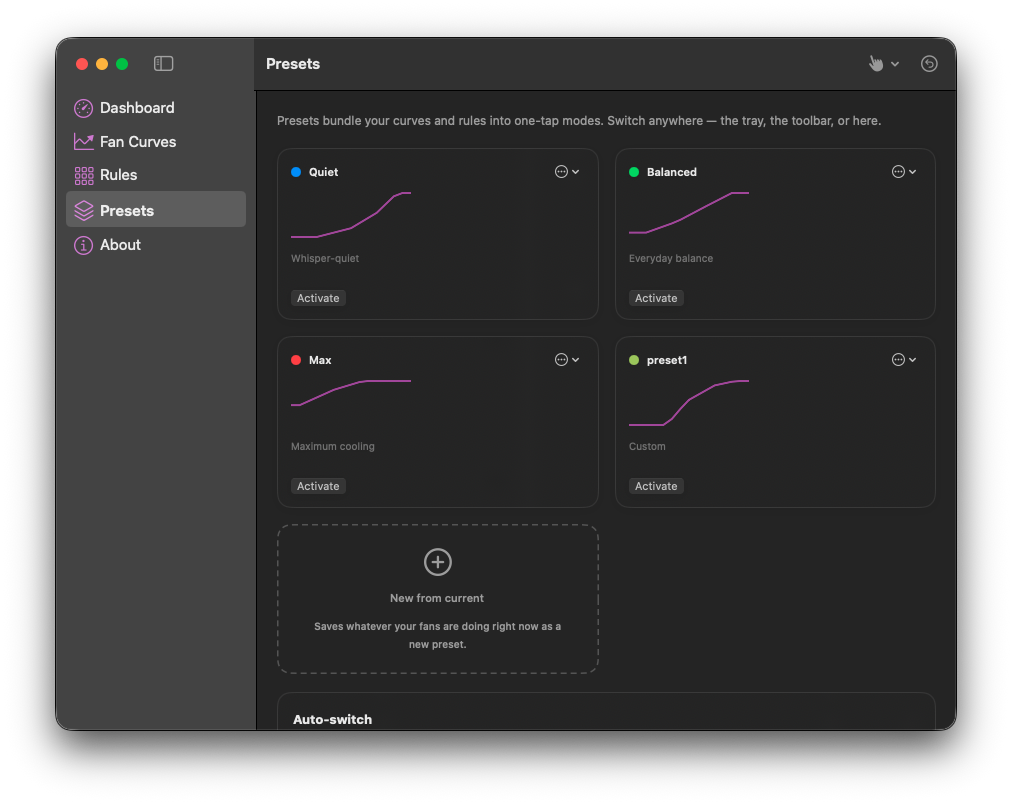
Use Presets to save a combination of curves and rules and switch it with Activate. The screenshot shows the Quiet, Balanced and Max presets alongside a custom preset. Those names describe selectable modes, not measured results for your Mac. Check the active controls after switching, and keep Auto available when you want to return control to macOS.
Try the manual controls, curves and presets during the trial, then compare the current plans. If you only want temperature and fan readings, monitoring stays free with no trial or license needed.
Limits to check first
CoolCurve does not support Intel Macs. On fanless models such as MacBook Air, monitoring can still be useful, but there is no curve to apply. If a fan is unexpectedly loud, check what is using the CPU first; changing a curve does not remove the underlying workload.
The implementation details below describe how the helper requests control and returns it to macOS. Hardware can reject a requested speed, so use the trial to check your own setup before choosing a license.
How it reaches the fan without ever asking for your password
Fan writes on a Mac require a privileged helper, and CoolCurve registers its helper through SMAppService, the same API Apple wants used for background daemons now. That call never produces a password prompt. The first registration leaves the helper sitting at a requires approval state, and CoolCurve deep links you straight to System Settings > General > Login Items & Extensions, where the toggle itself is the entire installation step. The app polls that status every few seconds afterward, because SMAppService has no way to notify you when you flip it, so it has to ask rather than wait to be told.
The helper only answers a caller whose code signature and Apple Developer team identifier match what it expects. That check runs on every connection, not once at launch, so a different process asking to move your fans gets nothing.
Getting a fan to accept a manual number is not one write
Asking the SMC to hand over manual control is a mode key write, and the firmware does not always release its own automatic mode instantly. CoolCurve tries the direct write first. If the firmware answers with its own busy code, the helper retries roughly ten times a second for up to ten seconds, because bailing out after one attempt would report a failure that was actually just a firmware still finishing its last thought. Holding that mode afterward takes continuous work too: a background daemon on the Mac reclaims manual control on its own schedule, so CoolCurve's helper reasserts the mode and the target every second and a half for as long as a fan stays under your control. Stop reasserting, even briefly, and the machine will quietly take manual mode back without telling you.
None of this is a workaround for a limit Apple intends to enforce. A hard ceiling sits inside the helper, not the interface: if any sensor reads ninety five degrees Celsius or higher, every fan in your plan drops back to Automatic immediately, and the curve editor draws that number as its own line so you can see the floor CoolCurve will not cross for you.
Four ways your fans come back, and one gap I will name plainly
Three of the four live in the privileged helper, not the app. The helper's own signal handlers catch SIGTERM and SIGINT and release every fan as it shuts down, whatever caused that shutdown. If the XPC connection between the app and the helper drops for any reason, that also triggers a release. If the app stops sending its heartbeat, every fifteen seconds without one hands every fan back regardless of why the heartbeat stopped, crash included. And a sweep at the helper's own startup resets any fan mode left over from an unclean shutdown before it even opens itself up to new connections.
Sleep and wake are not one of those four paths. Closing the lid does not run any code that releases your fans, because nothing in the app or the helper listens for a sleep or a wake notification at all. In practice this rarely matters, since a sleeping Mac is not actively running your curve against live sensors, but it is a real gap between what people assume an app like this does and what the code actually watches for, and I would rather say so than let you find out by wondering later.
Quit itself has a related honesty problem worth naming. The app fires the restore call and returns immediately rather than waiting for it to finish, so on a normal quit your fans are usually back on Automatic within a moment, but the only true backstop if that call never lands is the fifteen second heartbeat timeout running in the helper. Most of the time you will never notice the gap. It exists anyway.
What still needs a trip to System Settings
There is no button inside CoolCurve that removes the helper once you have approved it. The code path exists, and nothing in the app ever calls it. Taking the helper out again means opening System Settings > General > Login Items & Extensions yourself and turning it off there, the same place you turned it on. The full sensor pipeline behind every number on the dashboard is worth reading if you want to know exactly what is feeding the curve you are about to draw, and if a fan is loud today for a reason you have not found yet, working through the checklist before touching a setting will usually get there faster than a curve will.
Macs and habits this is not built for
A MacBook Air, and any other Apple silicon Mac with no fan, gives CoolCurve nothing to control. Fan discovery just asks the SMC how many fans exist, and a machine with none returns an empty list. The app shows a plain no fans detected message rather than telling you your Mac is fanless by design, so if that describes your machine, monitoring remains free, but there is no curve to draw and no reason to buy past that point.
There is no Intel build. Every compile targets Apple silicon only, so an older Intel Mac cannot run this regardless of what its fans need. And if a safety release fires, from the heat ceiling or a lost heartbeat, CoolCurve does not quietly resume your curve once things cool down. The plan drops to Automatic and stays there until you reopen the app and put it back, which is deliberate: resuming a manual target on its own after an unexplained safety trip is the one shortcut that would turn a safeguard into a new failure mode.
Questions people ask
Does CoolCurve need my admin password to install?
No. SMAppService does not prompt for one. You approve the helper in System Settings the same way you would approve any other login item, by flipping a switch rather than typing a password.
What happens to my fans if I force quit CoolCurve?
The helper's own heartbeat timeout is the backstop. If it stops hearing from the app for fifteen seconds, it releases every fan to Automatic on its own, independent of how the app process ended.
Can a rule take over a fan that is set to Automatic?
No. Rules and curves only govern fans already under manual or curve control in your plan. A fan left on Automatic stays there even if a rule's condition is met.
Will my curve come back on its own after the ninety five degree ceiling trips?
No. That release is meant to end a session, not pause it. You have to reopen CoolCurve and reapply the plan yourself once the machine has cooled.
Changelog: 22 July 2026, rewritten from a short product summary into a full explainer covering the helper, the restore paths, and what the app does not do.
September 18, 2026: added menu bar and curve setup guidance, clarified free and paid controls, and added the supplied presets screenshot. Existing implementation descriptions retain their earlier verification date.
September 26, 2026: updated what stays free after the trial; manual fan control now needs a license alongside curves, rules, presets and auto switching.