Turn one app down
Keep an app audible while lowering music or browser audio independently. Each detected audio app gets its own volume and mute controls.
Submix for Mac
Turn down one app without turning down everything else. Submix puts per-app volume, mute and output routing in your menu bar, so you can keep music, a browser and your other audio in balance.
From $7.99 once · 7-day full trial · macOS 14.2 or later
The download is open to everyone. No account needed. Check compatibility and setup
Put it to work
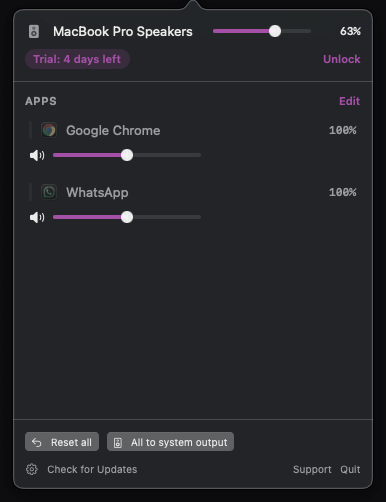
Keep an app audible while lowering music or browser audio independently. Each detected audio app gets its own volume and mute controls.
Send a supported app to headphones or another available output while the rest use the system output. Try your own apps and devices before buying.
Use Reset all for the mix, or All to system output to bring routed apps back to your Mac’s selected output.
Shown above: Submix’s menu-bar mixer with separate Chrome and WhatsApp sliders and the system output above them.
Made for the daily case
7 days to try every feature. Requires macOS 14.2 or later.
Before you start
Requires macOS 14.2 or later. For Apple Silicon Macs. Apps appear when they play audio. Audio capture and routing support can vary by app and output device; test your own setup during the trial.
Download and move Submix to Applications. Allow the audio-capture permission when macOS asks, then play audio in an app to see it in the mixer. If permission was denied, review Submix in System Settings → Privacy & Security and reopen it.
One-time purchase
Choose the number of Macs you use. Your license arrives at the email used at checkout.
7-day full trial One-time purchase, lifetime license License emailed instantly
Already own Submix? Send my license again.
1 Mac
$7.99
Lifetime license for 1 Mac.
2 Macs
$12.99
Lifetime license for 2 Macs.
3 Macs
$17.99
Lifetime license for 3 Macs.
Submix offers a 7 day full feature trial, no account required.
No, Submix is a one time purchase with a lifetime license. There is no recurring charge.
A single Submix license covers 1 to 3 Macs, depending on the plan you choose at checkout.
Submix requires macOS 14.2 or later.
Open license recovery and enter the email you used at checkout. We send a private, single-use link to your licenses and active devices.
The trial's features need a license to keep working. Restore audio routing stays available either way.
Requires macOS 14.2 or later. For Apple Silicon Macs. Apps appear when they play audio. Audio capture and routing support can vary by app and output device; test your own setup during the trial.
Download and move Submix to Applications. Allow the audio-capture permission when macOS asks, then play audio in an app to see it in the mixer. If permission was denied, review Submix in System Settings → Privacy & Security and reopen it.
Submix notes
Background Music failing to launch after a macOS update, sliders that do nothing, or sound gone quiet after uninstalling: which failures have fixes, which are the design, and what to run instead, with every claim attributed to the project's own README and issue tracker.
macOS has no per app volume slider, but the answer does not end there. The app's own controls, Safari's tab mute and the alert slider cover some cases, and a per app mixer covers the rest: one volume row per app, so you can lower or mute any of them alone.
Crackling, pops and dropouts after a Mac update are a documented chapter of macOS 26's launch. Here is the dated record from Apple's support communities and audio vendors, the workarounds that circulated, which ones make mechanical sense, and what a per app mixer honestly cannot fix.